
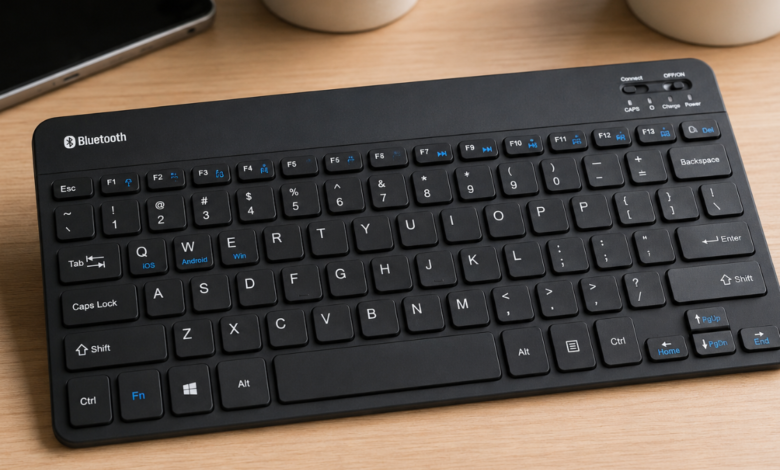
Bluetooth Keyboard: A Complete Guide to Choosing, Using, and Understanding Wireless Keyboards

A bluetooth keyboard is a simple but powerful device that can make typing more comfortable, flexible, and convenient. Unlike a traditional wired keyboard, it connects to a computer, tablet, smartphone, smart TV, or other compatible device without requiring a physical USB cable. This wireless design gives users more freedom to organize their workspace and type from a comfortable distance.
Today, keyboards are used for much more than writing documents. People use them for online learning, office work, gaming, emails, social media, coding, research, and entertainment. As a result, having a reliable keyboard can make everyday digital tasks easier. A bluetooth keyboard is especially useful for people who want a clean desk, portable setup, or simple way to connect multiple devices.
Whether you’re a student, office worker, content creator, traveler, or casual computer user, understanding how these keyboards work can help you make a smarter choice. From battery life and compatibility to key design and portability, there are several factors worth considering before buying one.
What Is a Bluetooth Keyboard?
A bluetooth keyboard is a wireless keyboard that uses Bluetooth technology to communicate with another electronic device. Instead of sending information through a cable, the keyboard sends keystrokes wirelessly to a connected device.
Bluetooth is a short-range wireless communication technology. It has become common in computers, mobile phones, tablets, headphones, cars, and many other electronic products. Because it doesn’t normally require a separate receiver plugged into a USB port, it can be a convenient option for modern devices.
When you press a key, the keyboard detects the action and sends the corresponding information through its Bluetooth connection. The connected device receives the signal and displays the letter, number, symbol, or command.
The basic process is straightforward:
- Turn on the keyboard.
- Activate Bluetooth pairing mode.
- Open Bluetooth settings on the target device.
- Select the keyboard from the available devices.
- Complete the pairing process.
- Start typing.
Once paired, many keyboards can reconnect automatically when they are turned on and within range.
Why a Bluetooth Keyboard Is Useful
One of the biggest advantages of a bluetooth keyboard is freedom from cables. A wired keyboard can work very well, but its cable can limit where you place the keyboard and connected device. A wireless model removes much of that restriction.
For example, someone using a tablet can place the tablet on a stand and keep the keyboard at a comfortable distance. An office worker can move the keyboard around the desk without worrying about cable length. A traveler can also carry a compact keyboard in a bag and use it when needed.
A bluetooth keyboard can offer several practical benefits:
- Wireless convenience: No keyboard cable is required.
- Cleaner workspace: Fewer wires can create a more organized desk.
- Portability: Compact models are easy to carry.
- Device flexibility: Many models work with several types of devices.
- Comfort: Users can position the keyboard according to their preferred posture.
- Easy setup: Pairing is usually simple.
- USB freedom: A USB port isn’t needed for the Bluetooth connection.
That said, wireless keyboards aren’t perfect for every situation. Battery charging or replacement is one consideration. Some models may also experience connection problems if there is interference or if the battery is nearly empty.
Bluetooth Keyboard Compatibility With Modern Devices
Before purchasing a bluetooth keyboard, compatibility should be one of your first checks. A keyboard may support several operating systems, but features can sometimes vary between platforms.
Most modern Bluetooth keyboards are designed to work with popular devices such as:
- Windows computers
- Mac computers
- Android phones
- Android tablets
- iPhones
- iPads
- Some smart TVs
- Certain gaming and media devices
However, compatibility isn’t only about whether the keyboard can connect. Special keys and shortcuts may behave differently depending on the operating system.
For instance, a keyboard designed mainly for Windows may include a Windows key, while a Mac-focused keyboard may use Command and Option keys. Some keyboards have special layouts that support both systems.
Before buying, check:
| Feature | What to Check |
|---|---|
| Bluetooth support | Confirm the device supports Bluetooth keyboards |
| Operating system | Check Windows, macOS, Android, iOS, or other support |
| Keyboard layout | Make sure the key arrangement suits you |
| Special keys | Check whether media and shortcut keys work |
| Multi-device support | See whether the keyboard can pair with several devices |
| Battery | Check charging or battery requirements |
| Range | Review the manufacturer’s stated wireless range |
Taking a few minutes to check compatibility can prevent unnecessary frustration later.
Bluetooth Keyboard for Work and Productivity
A bluetooth keyboard can be an excellent addition to a home office or professional workspace. Typing on a physical keyboard can feel faster and more natural than typing long documents on a touchscreen.
For office work, a keyboard is useful for writing emails, preparing reports, entering information, managing spreadsheets, and communicating with colleagues. People who spend several hours each day typing may also appreciate a keyboard with comfortable key spacing and a suitable typing angle.
A wireless keyboard can also help organize a desk. Instead of keeping the keyboard permanently attached to a computer by cable, you can move it when you need additional desk space.
For productivity, look for features such as:
- Comfortable key spacing
- Quiet or low-noise keys
- Reliable wireless connection
- Good battery life
- Dedicated shortcut keys
- Full-size layout when a number pad is important
- Comfortable typing angle
- Durable construction
The best option depends on the type of work you do. A writer may care most about typing comfort, while an accountant may place greater importance on a number pad.
Bluetooth Keyboard for Students and Online Learning
Students can also benefit from a bluetooth keyboard, particularly when using tablets for schoolwork. Touchscreens are excellent for browsing and entertainment, but typing long assignments on a screen can become tiring.
A compact wireless keyboard can turn a tablet into a more practical writing tool. Students can use it for:
- Writing assignments
- Taking notes
- Searching online
- Creating presentations
- Sending emails
- Participating in online classes
- Writing research notes
- Working on documents
Portability is another major advantage. A small keyboard can fit inside a backpack or laptop bag without taking up much room.
However, students should consider durability. School equipment can be moved around frequently, so a keyboard with a sturdy design may be a better long-term choice than an extremely delicate model.
Bluetooth Keyboard for Tablets and Smartphones
Phones and tablets have become powerful enough to handle many tasks that once required a computer. Yet, typing large amounts of text on a touchscreen can still be inconvenient.
A bluetooth keyboard provides a physical typing experience without requiring a wired connection. This can be particularly useful for people who use their tablets for writing, blogging, note-taking, or managing documents.
Imagine sitting in a café with a tablet and keyboard instead of carrying a full laptop. It’s a small setup, but it can provide plenty of flexibility.
When choosing a keyboard for mobile devices, portability matters. A full-size keyboard may offer a comfortable typing experience but can be difficult to carry. Compact keyboards are easier to transport but may have smaller keys.
Foldable keyboards can provide another option. They are designed to collapse into a smaller shape, making them useful for frequent travelers.
Bluetooth Keyboard Battery Life and Charging
Battery life is one of the most important features to consider when selecting a bluetooth keyboard. Since the keyboard doesn’t receive power through a cable connected to the computer, it needs its own power source.
Some keyboards use replaceable batteries, while others have built-in rechargeable batteries.
Each design has advantages.
Replaceable batteries:
- Easy to replace
- No waiting for charging
- Can be useful during travel
- May provide long operating time
Rechargeable batteries:
- Convenient for regular use
- No need to purchase disposable batteries frequently
- Can often be charged using a USB cable
- Usually easy to recharge overnight
Battery performance depends on the keyboard, usage habits, backlighting, wireless features, and battery capacity.
Backlit keyboards may consume more energy because their lighting requires additional power. If long battery life is your priority, a keyboard without bright backlighting may be a sensible choice.
It’s also smart to check whether the keyboard gives a low-battery warning. After all, nobody wants the keyboard to stop working halfway through an important email.
Bluetooth Keyboard Connectivity and Wireless Range
A bluetooth keyboard relies on a wireless connection, so connection quality matters. Bluetooth is generally designed for short-range communication, making it suitable for desks, classrooms, living rooms, and similar environments.
The actual range can vary depending on the keyboard, connected device, surroundings, and interference. Walls, other wireless devices, and crowded wireless environments can sometimes affect performance.
If the keyboard isn’t connecting properly, try these simple steps:
- Make sure Bluetooth is enabled on the target device.
- Confirm the keyboard is powered on.
- Check whether the keyboard is in pairing mode.
- Move the keyboard closer to the device.
- Remove old or unnecessary Bluetooth pairings.
- Restart Bluetooth.
- Restart the connected device.
- Recharge or replace the keyboard battery.
- Pair the keyboard again if necessary.
Most connection issues are relatively simple to solve. Don’t panic; a quick reset often does the trick.
Bluetooth Keyboard Key Types and Typing Comfort
The physical design of the keys has a major effect on typing comfort. A bluetooth keyboard can use different key mechanisms and layouts, each providing a different experience.
Some keyboards have shallow laptop-style keys. These can feel familiar and compact. Others have taller keys that provide more physical movement when pressed.
Mechanical keyboards use individual mechanical switches beneath the keys. They are often popular among enthusiasts, gamers, programmers, and people who enjoy a more distinctive typing feel.
Membrane keyboards use a different internal design and are often quieter and more affordable.
When selecting a keyboard, consider:
- Key travel
- Key spacing
- Key size
- Noise level
- Typing angle
- Wrist comfort
- Keyboard height
- Layout
- Overall size
There’s no single design that’s perfect for everyone. The right keyboard should feel natural under your fingers and allow you to type without unnecessary strain.
Bluetooth Keyboard Size and Layout Options
A bluetooth keyboard can come in many sizes. The right size depends on where and how you plan to use it.
A full-size keyboard usually includes:
- Function keys
- Number row
- Navigation keys
- Arrow keys
- Dedicated number pad
- Standard letter layout
This design is ideal for office work, spreadsheets, and users who prefer a traditional desktop experience.
Compact keyboards remove some keys or combine functions to reduce size. They’re often better for travel and small desks.
A smaller keyboard may be perfect for a tablet user, while someone working with financial spreadsheets may prefer a full-size model with a number pad.
Multi-Device Bluetooth Keyboards
One particularly useful feature available on some bluetooth keyboard models is multi-device connectivity. These keyboards can pair with more than one device and allow the user to switch between them.
For example, you could connect a keyboard to:
- A desktop computer
- A tablet
- A smartphone
With a device-switch button, you may be able to move from one device to another without repeatedly going through the pairing process.
This feature is especially useful for people who work across several devices. Instead of keeping multiple keyboards on your desk, one compatible keyboard can handle several tasks.
Before purchasing, check how many devices the keyboard supports and how the switching process works.
Bluetooth Keyboard vs Wired Keyboard
Both wireless and wired keyboards have advantages. Choosing between them depends on your needs.
| Feature | Bluetooth Keyboard | Wired Keyboard |
|---|---|---|
| Connection | Wireless | Cable |
| Portability | Usually excellent | Less convenient |
| Cable clutter | Minimal | More noticeable |
| Power | Battery or rechargeable | Usually powered through cable |
| USB port needed | Usually no | Usually yes |
| Setup | Pairing required | Usually plug and play |
| Multi-device use | Available on some models | Less convenient |
| Travel use | Very convenient | More difficult |
| Maintenance | Battery management | Cable management |
For a clean and flexible setup, a bluetooth keyboard is often attractive. For a fixed desktop where you want a direct connection without worrying about batteries, a wired keyboard can still be a great choice.
Bluetooth Keyboard Features Worth Considering
Keyboard manufacturers offer many features, but you don’t need every feature to get a good typing experience.
Think about your real needs first.
Backlighting
Backlit keys can make typing easier in dim environments. However, lighting can use additional battery power.
Multi-Device Switching
This is useful if you regularly use a computer, tablet, and smartphone.
Compact Design
A compact bluetooth keyboard can be ideal for travelers and people with limited desk space.
Number Pad
A dedicated number pad is useful for accounting, spreadsheets, data entry, and calculations.
Media Controls
Volume, play, pause, and other media controls can make entertainment easier.
Adjustable Design
Some keyboards offer stands or adjustable angles to improve comfort.
Rechargeable Battery
A built-in rechargeable battery can make everyday use convenient and reduce the need for disposable batteries.
How to Choose the Right Bluetooth Keyboard
Choosing a bluetooth keyboard doesn’t have to be complicated. Start by considering how you’ll actually use it.
If you mostly work at a desk, comfort and key quality should be high on your list. If you travel frequently, size and weight may matter more.
Ask yourself:
- What device will I connect it to?
- Do I need a full-size or compact layout?
- Will I use it for long typing sessions?
- Do I need a number pad?
- How important is battery life?
- Do I need backlighting?
- Will I connect more than one device?
- Do I need a quiet keyboard?
- How often will I travel with it?
- What is my budget?
Don’t simply choose a keyboard because it has the most features. A product with fewer features but better comfort and reliability may be the better investment.
Bluetooth Keyboard Maintenance Tips
Proper care can help extend the life of a bluetooth keyboard. Keyboards collect dust, food particles, and other small debris over time.
To keep yours in good condition:
- Keep food and drinks away when possible.
- Clean the surface regularly.
- Follow the manufacturer’s cleaning instructions.
- Avoid using excessive liquid.
- Store portable keyboards safely during travel.
- Don’t leave rechargeable batteries completely empty for long periods.
- Protect the keyboard from extreme heat and moisture.
- Turn it off when it isn’t needed if the manufacturer recommends doing so.
If keys become difficult to press, don’t immediately assume the keyboard is broken. Dust or debris may sometimes be responsible.
Common Bluetooth Keyboard Problems and Solutions
Even a high-quality bluetooth keyboard can occasionally experience problems. Fortunately, many common issues are easy to troubleshoot.
Keyboard Will Not Connect
Check whether Bluetooth is active and whether the keyboard is in pairing mode. If necessary, remove the keyboard from the device’s saved Bluetooth list and pair it again.
Keyboard Keeps Disconnecting
Check the battery level and move closer to the connected device. Wireless interference may also affect the connection.
Some Keys Don’t Work
Check for dirt or debris. If the problem continues, test the keyboard with another compatible device to determine whether the issue is with the keyboard or the original device.
Keyboard Is Typing Slowly
A delayed response may be caused by low battery, wireless interference, or a temporary connection issue. Recharging and reconnecting can help.
Keyboard Won’t Turn On
Check the power switch and battery. For rechargeable models, connect the charging cable and allow sufficient charging time.
These simple checks can resolve many everyday issues without requiring professional help.
Is a Bluetooth Keyboard Good for Gaming?
A bluetooth keyboard can be used for some gaming setups, especially when convenience and portability matter. However, serious competitive gamers may prefer wired or specialized wireless gaming keyboards.
Gaming performance depends on factors such as response time, connection stability, key switches, and software support. Casual gamers may find Bluetooth perfectly suitable for their needs, while competitive players may have more demanding requirements.
For casual gaming, smart TV use, tablet gaming, and general computer entertainment, a Bluetooth keyboard can be a practical choice.
Bluetooth Keyboard Security and Privacy
Wireless technology should always be used responsibly. Bluetooth connections include security features, but users should still follow basic safety practices.
Avoid pairing your keyboard with unknown devices. When using public or shared environments, check your Bluetooth settings and remove connections you no longer need.
It’s also wise to keep your computer, tablet, or phone updated. Security updates can improve the overall safety of the device ecosystem.
A bluetooth keyboard is generally designed for convenience, but good digital habits make the entire experience safer and more reliable.
Who Should Buy a Bluetooth Keyboard?
A bluetooth keyboard can be a strong option for many types of users.
It may be especially useful for:
- Students who use tablets
- Office professionals
- Writers and bloggers
- Remote workers
- Travelers
- Programmers
- People with small desks
- Smart TV users
- Multi-device users
- Home computer users
However, someone who never needs wireless connectivity may find a basic wired keyboard perfectly adequate.
The key is to match the keyboard to your daily routine rather than buying based only on appearance or marketing claims.
Final Thoughts on Bluetooth Keyboard
A bluetooth keyboard can make modern computing more flexible, organized, and comfortable. Its wireless design removes cable clutter and allows users to position their keyboard more freely. For students, professionals, travelers, tablet users, and people working with multiple devices, this flexibility can be extremely valuable.
The best choice depends on several factors, including compatibility, battery life, keyboard size, typing comfort, connectivity, layout, and special features. Some users may want a compact travel keyboard, while others may need a full-size model with a number pad and comfortable keys.
Before making a purchase, think about your everyday needs. Check device compatibility, consider how often you’ll travel, and decide which features actually matter to you. Don’t overlook comfort, either. A keyboard is something you’ll potentially use for hours, so a comfortable typing experience can make a meaningful difference.
With the right choice and basic maintenance, a bluetooth keyboard can become a reliable part of your digital setup, helping you type, work, study, create, and communicate with greater freedom.
Ergonomic Mouse: A Complete Guide to Comfort, Productivity, and Better Computer Use
