
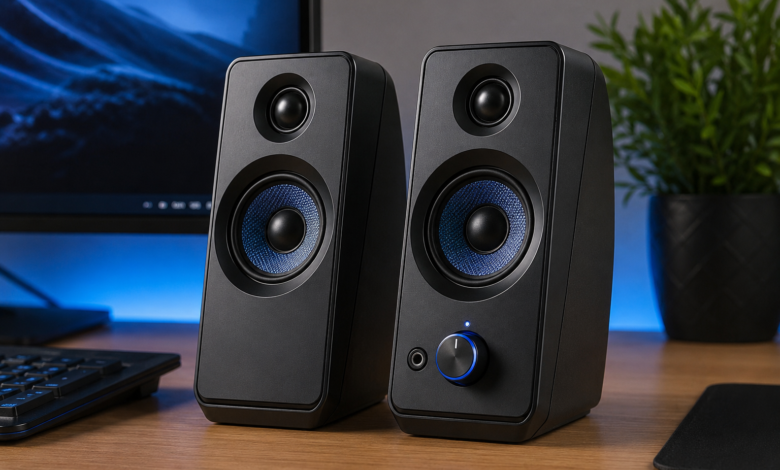

Computer speakers can make a big difference in the way you enjoy music, movies, games, online classes, video calls, and everyday computer work. While many computers have built-in speakers, they often produce limited sound. External speakers can offer louder audio, clearer voices, stronger bass, and a more enjoyable listening experience.
Whether you have a desktop computer, laptop, gaming setup, or home office, choosing the right speakers doesn’t have to be difficult. There are many models available, ranging from small budget speakers to powerful systems designed for serious music and gaming.
The best choice depends on your needs, available desk space, connection options, sound preferences, and budget. In this guide, we’ll explore how computer speakers work, the different types available, important features to consider, and practical tips for getting the best sound from your setup.
What Are Computer Speakers?
Computer speakers are external audio devices designed to produce sound from a computer or another compatible device. They connect to a computer using a wired or wireless connection and turn digital audio signals into sound that you can hear.
Most basic speaker systems contain two speaker units, often called left and right channels. Some systems include an additional subwoofer that produces deeper bass. More advanced setups can contain multiple speakers for a wider and more detailed soundstage.
Computer speakers can be useful for many activities, including:
- Listening to music
- Watching movies and TV shows
- Playing video games
- Attending online meetings
- Taking online classes
- Editing videos
- Listening to podcasts
- Watching YouTube videos
- Making voice calls
- Creating music and other audio content
Unlike headphones, speakers allow you to enjoy sound without wearing anything on your ears. That’s especially useful when you’re working at a desk for several hours.
Why Computer Speakers Are Important
A computer’s built-in speakers are designed to save space. Because they are usually very small, they have limited room for speaker drivers and sound-producing components. This can make audio sound thin, weak, or unclear.
Adding a dedicated speaker system can improve the overall experience. A good set of computer speakers can make voices easier to understand and music more enjoyable.
For example, during a movie, you may notice clearer dialogue and deeper background sounds. In a game, improved audio can help you hear footsteps, effects, and environmental sounds more clearly.
Good speakers can also make a difference during work. If you regularly attend video meetings, clear voice reproduction can help you understand other people without constantly adjusting the volume.
In short, external speakers aren’t just about making sound louder. They’re about making sound better.
Types of Computer Speakers
There isn’t a single type of speaker that is perfect for everyone. Different systems are designed for different users and environments.
Two-Channel Computer Speakers
Two-channel speakers are among the most common options. They usually include a left speaker and a right speaker.
This setup creates basic stereo sound. It’s simple, affordable, and suitable for everyday activities.
Two-channel speakers are a good choice for people who want:
- Simple installation
- Compact design
- Affordable pricing
- Stereo music
- Clear video and voice audio
- Minimal cables
For everyday computer use, a good stereo system can be more than enough.
Computer Speakers With a Subwoofer
Some speaker systems include two small satellite speakers and a separate subwoofer.
The satellite speakers handle much of the midrange and high-frequency sound, while the subwoofer focuses on low-frequency bass.
This arrangement can produce a more powerful sound. It’s particularly useful for music, movies, and gaming.
However, subwoofers take up additional space. If your desk is small, a compact speaker system may be more practical.
USB Computer Speakers
USB speakers connect directly to a computer through a USB port. Depending on the model, USB can provide both power and audio.
One major advantage is convenience. You may not need a separate power adapter, which can reduce cable clutter.
USB speakers can be a useful choice for:
- Office desks
- Laptops
- Small workstations
- Portable setups
- Students
- Simple plug-and-play systems
Before buying, check what type of USB connection the speakers require and whether your computer has a compatible port.
Wireless Computer Speakers
Wireless speakers usually connect through Bluetooth or another wireless technology.
They can create a cleaner-looking desk because fewer cables are needed between the computer and speakers.
Wireless models are especially convenient if you also want to connect phones, tablets, or other devices.
The main thing to remember is that wireless audio depends on the quality and compatibility of the connection. Battery-powered models also need to be charged regularly.
Gaming Computer Speakers
Gaming speakers are designed with gamers in mind. They may include stronger bass, lighting effects, gaming-focused sound modes, or multiple connection choices.
While appearance can be attractive, sound quality should remain the priority.
A gaming speaker system can be useful if you want your desktop setup to create a more immersive atmosphere. However, you don’t necessarily need a speaker marketed specifically for gaming to get excellent game audio.
Important Features to Look For in Computer Speakers
Choosing speakers becomes easier when you know which features actually matter.
Sound Quality
Sound quality should be your first consideration.
Listen for balanced audio rather than focusing only on loudness. Good speakers should reproduce voices, music, effects, and instruments without sounding harsh or distorted.
A useful speaker should provide:
- Clear dialogue
- Balanced midrange
- Detailed high frequencies
- Controlled bass
- Low distortion
- Good stereo separation
More power doesn’t automatically mean better sound. A smaller, well-designed speaker can sound better than a larger but poorly designed system.
Power
Speaker specifications often mention watts. Power can provide an idea of how strongly the speakers can operate, but it shouldn’t be the only specification you consider.
A desk speaker doesn’t need extremely high power to sound good in a normal room.
For a small workspace, moderate power is often enough. Larger rooms may benefit from a stronger system.
Bass
Bass gives music and movies their sense of depth and impact.
Some people prefer powerful bass, while others want a more balanced sound. If you enjoy action movies, electronic music, hip-hop, or games, a subwoofer may be attractive.
However, too much bass can make audio muddy. The best bass is controlled and works together with the rest of the sound.
Connectivity
Check how the speakers connect before purchasing.
Common options include:
- USB
- 3.5 mm audio
- Bluetooth
- Optical audio
- RCA connections
- HDMI on selected systems
A speaker with multiple connection options can be more flexible, especially if you use several devices.
Volume Controls
Easy-to-reach volume controls are surprisingly useful.
Some speakers place the controls on the front. Others use a wired control pod or remote control.
A convenient volume knob can be better than reaching behind your desk every time you want to change the volume.
Headphone Output
Some computer speakers include a headphone jack.
This feature lets you quickly switch from speakers to headphones without reaching around the back of the computer.
It’s a small feature, but it can make everyday use much easier.
Size and Design
Desk space matters.
Large speakers may provide a bigger sound, but they can take up valuable workspace. Compact speakers are easier to place but may have less bass and soundstage.
Before buying, measure your desk and think about where the speakers will sit.
Computer Speakers Comparison Table
| Speaker Type | Best For | Main Advantage | Possible Limitation |
|---|---|---|---|
| Two-channel speakers | Everyday use | Simple stereo sound | Limited bass on small models |
| USB speakers | Offices and laptops | Easy connection | May have limited power |
| Bluetooth speakers | Flexible setups | Wireless connection | Requires wireless compatibility |
| Speakers with subwoofer | Movies and music | Stronger bass | Takes more space |
| Gaming speakers | Gaming setups | Immersive presentation | Some models focus heavily on appearance |
| Premium stereo speakers | Music lovers | Detailed sound | Usually more expensive |
How to Position Computer Speakers Correctly
Even excellent computer speakers can sound disappointing if they’re positioned poorly.
Speaker placement affects stereo separation, clarity, and bass.
For a typical two-speaker setup, place the left speaker on the left side of your monitor and the right speaker on the right side. Try to keep them at roughly the same distance from your listening position.
The speakers should generally point toward your ears rather than directly toward the wall.
Avoid placing both speakers too close together. If they’re side by side, the stereo effect becomes weaker.
A simple setup might look like this:
- Left speaker beside the monitor
- Right speaker beside the monitor
- Speakers angled slightly toward you
- Similar distance between each speaker and your seating position
- Subwoofer placed on a stable surface or suitable floor position
Experiment with the placement. Sometimes moving a speaker just a few inches can noticeably change the sound.
Computer Speakers for Music
Music is one of the most popular reasons people buy external speakers.
When choosing speakers for music, look for balanced sound rather than exaggerated bass. A balanced system should allow you to hear vocals, instruments, rhythm, and details without one part overpowering everything else.
Different music styles can also influence your preference.
Rock and live music may benefit from strong stereo separation. Classical music can benefit from detail and clarity. Electronic music may sound more exciting with deeper bass.
If possible, listen to speakers before buying them. Audio is personal, and specifications can’t fully describe how a speaker will sound to your ears.
Computer Speakers for Gaming
Gaming can become more immersive with a good speaker setup.
Sound can help players understand what’s happening around them. Depending on the game, audio may provide important information about movement, vehicles, weapons, weather, or environmental effects.
Stereo speakers can already provide useful left-and-right positioning. More advanced systems may create a wider sound field.
Still, don’t assume that more speakers automatically mean better gaming audio. Proper placement and good sound quality are often more important.
If you’re building a gaming desk, consider speakers that have:
- Clear directional sound
- Low distortion
- Strong but controlled bass
- Easy volume adjustment
- Multiple connection options
- A design that fits your desk
Computer Speakers for Movies and Entertainment
Movies often contain a wide range of sounds, from quiet conversations to loud action scenes.
A capable speaker system can make these changes more enjoyable. Dialogue should remain clear while music and effects provide depth.
A system with a subwoofer can make explosions, engines, and other low-frequency effects feel more powerful.
However, people living in apartments or shared homes may prefer moderate bass to avoid disturbing others.
For casual movie watching, a good stereo setup can be a practical and affordable choice.
Computer Speakers for Work and Online Meetings
Office users don’t always need powerful speakers.
For work, clarity is usually more important than volume. During meetings, voices should sound natural and easy to understand.
Compact USB speakers can be useful for an office because they’re simple to connect and don’t require a complicated setup.
A speaker system with a headphone output can also be convenient when you need privacy.
If you work from home, place the speakers so they don’t block your monitor or interfere with your microphone.
Wired vs Wireless Computer Speakers
Both wired and wireless speakers have advantages.
Wired Speakers
Wired speakers are often preferred for their simplicity and reliability.
Advantages include:
- Stable connection
- No battery charging
- Low setup complexity
- Often lower cost
- Suitable for permanent desk setups
The downside is cable management. Several wires can make a desk look messy.
Wireless Speakers
Wireless models can create a cleaner workspace.
Advantages include:
- Fewer cables
- Easy connection to compatible devices
- Flexible placement
- Useful for multi-device users
The disadvantages may include battery charging, wireless compatibility issues, or occasional connection problems.
The best choice depends on how you use your computer.
How to Improve Computer Speakers Sound
You don’t always need to buy new speakers to improve your audio.
Try these simple steps first.
Adjust Speaker Placement
Move the speakers closer to ear level and angle them toward your listening position.
Reduce Excessive Volume
Playing speakers at their maximum volume can cause distortion. A slightly lower volume may produce cleaner sound.
Check Your Computer’s Audio Settings
Your operating system may include equalizer or sound enhancement options. Use these carefully because extreme settings can make audio unnatural.
Keep Speakers Away From Obstructions
Don’t cover the speaker drivers with books, objects, or other equipment.
Organize Your Desk
A clean workspace can make it easier to place speakers correctly.
Check Your Cables
Loose cables can cause audio problems, crackling, or one-sided sound. Make sure every connection is secure.
Common Mistakes When Buying Computer Speakers
Many buyers focus on the wrong things when shopping for speakers.
One common mistake is choosing a system only because it has a high wattage rating. Power doesn’t tell the whole story.
Another mistake is buying speakers that are too large for the available desk space.
Some people also choose a product based only on appearance. Attractive lighting and modern designs can be appealing, but they don’t guarantee excellent sound.
Other mistakes include:
- Ignoring connection compatibility
- Buying without checking speaker dimensions
- Expecting a tiny speaker to produce huge bass
- Choosing maximum volume over sound quality
- Forgetting about cable management
- Ignoring warranty and support
- Not considering how the speakers will actually be used
Think about your daily needs first. Then compare features.
How Much Should You Spend on Computer Speakers?
There is no single price that works for everyone.
Budget speakers can be suitable for basic computer tasks, while mid-range systems may offer better sound, stronger construction, and more useful features.
Premium models can provide excellent detail and a more refined listening experience.
Instead of asking, “How expensive should my speakers be?” ask:
“What do I need my speakers to do?”
If you mainly attend meetings and watch videos, you may not need an expensive system.
If you spend hours listening to music or playing games, investing more in sound quality may make sense.
A good approach is to establish your budget first and then compare the best options within that range.
Maintaining Computer Speakers
Proper care can help your speakers last longer.
Keep the speakers away from liquids and excessive dust. Don’t place heavy objects on them, and avoid blocking ventilation openings if the design includes them.
Clean the exterior gently with a dry or slightly damp cloth according to the manufacturer’s instructions.
For powered systems, switch them off when they’re not needed for long periods.
If your system has a subwoofer, make sure it sits securely. Vibrations can cause objects placed nearby to move or rattle.
Good maintenance doesn’t have to be complicated. A little care can go a long way.
Are Expensive Computer Speakers Worth It?
Expensive speakers can provide better materials, improved drivers, stronger amplification, better connectivity, and more detailed sound.
However, expensive doesn’t always mean better for every person.
A premium speaker system may be unnecessary for someone who mainly watches short videos and attends meetings. On the other hand, someone who listens to music every day may appreciate the extra quality.
Your listening habits should guide your purchase.
It’s also worth remembering that your room, desk, audio source, and speaker placement affect the final result.
Computer Speakers and Room Size
Room size can influence the speaker system you need.
A small bedroom or office doesn’t require extremely powerful speakers. In fact, too much power can make the space uncomfortable.
A larger room may need a stronger system to produce satisfying volume across the space.
For a typical desk setup, compact stereo speakers are often practical because they focus sound toward the person sitting at the computer.
Before buying large speakers, consider whether you actually need them. Bigger isn’t always better.
The Future of Computer Speakers
Speaker technology continues to improve.
Modern products are becoming more flexible, with features such as wireless connectivity, improved digital processing, compact designs, voice control, and better integration with computers and smart devices.
At the same time, traditional wired speakers remain popular because they offer dependable connections and simple operation.
The future will likely bring more choice rather than one universal speaker design. Users will be able to select systems based on their specific needs, whether that’s gaming, music, office work, entertainment, or creative production.
Frequently Asked Questions About Computer Speakers
Do I really need external computer speakers?
Not everyone needs them. Built-in speakers may be enough for basic tasks. External speakers are useful when you want better volume, clarity, bass, or stereo sound.
Are USB computer speakers good?
Yes. USB speakers can be convenient, especially for office desks and laptops. Their quality varies by model, so check the speaker specifications and user reviews before buying.
Are Bluetooth computer speakers better than wired speakers?
Neither is automatically better. Bluetooth offers convenience and fewer cables, while wired speakers provide a direct connection and don’t require battery charging.
Can computer speakers be used with a laptop?
Yes. Many speakers work with laptops through USB, Bluetooth, 3.5 mm audio, or other supported connections.
Is a subwoofer necessary?
No. A subwoofer is optional. It can provide deeper bass, but many users are perfectly happy with a good pair of stereo speakers.
How can I make my speakers louder?
You can adjust the computer and speaker volume settings, but avoid pushing speakers beyond their clean operating range. Excessive volume may cause distortion.
What matters more, power or sound quality?
Sound quality is generally more important. A powerful speaker isn’t useful if it produces distorted or unbalanced audio.
Final Thoughts on Computer Speakers
Choosing the right computer speakers doesn’t have to be confusing. The best system is the one that fits your listening habits, desk space, computer connections, room, and budget.
For basic work, compact stereo speakers may be ideal. For music and movies, you may prefer a system with stronger bass. Gamers can look for clear stereo imaging and immersive sound, while office users may value simple USB connectivity and clear voices.
Remember, specifications are only part of the decision. Speaker placement, room conditions, audio settings, and personal preference also influence the listening experience.
Take your time, compare the important features, and choose quality over unnecessary extras. With the right computer speakers, your ordinary desktop can become a much more enjoyable place to work, listen, watch, and play.
You may also read
How Long Do Apple AirTags Last? A Complete Guide to Battery Life and Lifespan
